Networking & Content Delivery
Routing UDP to on-premises Network Load Balancer targets
On-premises migrations to AWS rarely finish in one wave. Dependencies and competing priorities keep some workloads on premises: a virtual desktop gateway, an IPsec VPN headend, applications awaiting modernization. Those workloads can still use the AWS global network.
Assume your users are in India and their virtual desktops live in North America. That is a long trip for a display protocol, which streams the desktop over UDP, so you put AWS in front of it. AWS Global Accelerator gives you anycast IP addresses close to your users, and an internal Elastic Load Balancing Network Load Balancer picks the traffic up in your Amazon Virtual Private Cloud (Amazon VPC). You register the on-premises virtual desktop gateway (such as VMware Horizon) as the target over AWS Direct Connect.
Your users connect, but the desktops are painful to use. The display protocol never gets its UDP transport working, so every session falls back to TCP. On a path this long, retransmission turns packet loss into frozen screens and input lag.
So you start digging, and everything looks fine. VPC Flow Logs show packets both ways, a service capture shows requests arriving and replies leaving, and no component reports an error.
Virtual desktops are not special. Any on-premises UDP service behind a Network Load Balancer hits this. Protocols with a TCP fallback, such as QUIC and real-time media, degrade quietly while dashboards stay green. Those without one fail outright: IPsec needs UDP encapsulation to cross a load balancer, so the tunnel never establishes.
This 300-level post explains why those flows cannot return, and how to fix it with Amazon Elastic Compute Cloud (Amazon EC2) proxy instances running kernel NAT, one per Availability Zone (AZ). It assumes familiarity with load balancing, hybrid connectivity, and Linux networking.
Why the symptoms mislead
Three observations send troubleshooting the wrong way.
Bidirectional flow log records do not mean the flow works. They show packets both ways at that hop, not whether the client accepted the reply.
An unhealthy target that still passes traffic is expected. When every target is unhealthy, the load balancer fails open and forwards to all of them. You cannot tell fail-open from working without checking the target group health status.
Protocol-level “progress” can be an artifact. IPsec peers float to UDP 4500 even with no NAT device between them, because the load balancer rewrites the destination, breaking IKE NAT-detection hashes. The float proves only that the first exchange completed.
How the Network Load Balancer handles the UDP return path
Follow a packet through Figure 1.
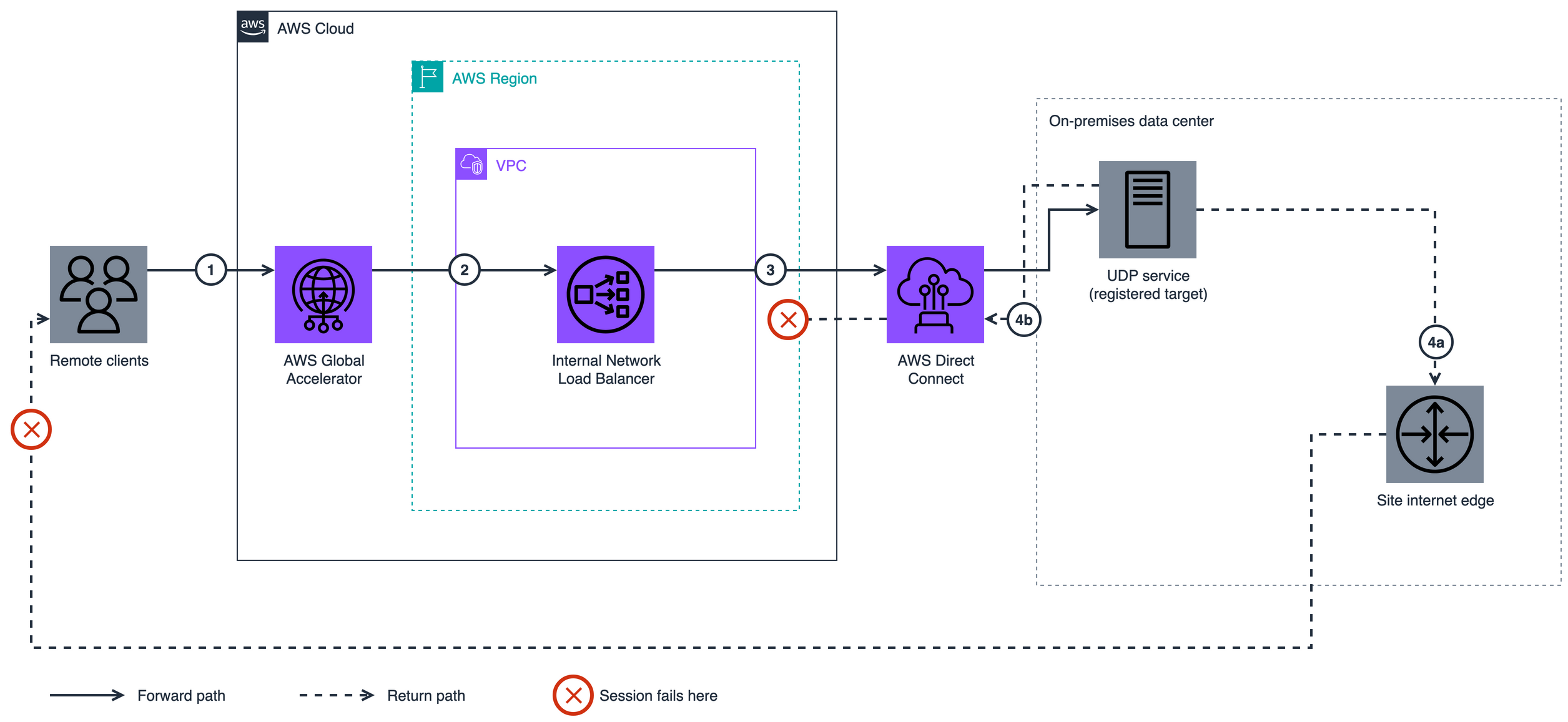
Figure 1: The UDP return path with an on-premises target
Figure 1 depicts the following data flow:
1: A client datagram arrives at a Global Accelerator anycast IP address.
2: Global Accelerator delivers it to the load balancer, client source IP preserved.
3: The load balancer rewrites only the destination, so the service sees the client’s public IP as source.
4a: The service replies to that address. With no route toward AWS, the reply exits the site internet edge and the client discards it.
4b: With a default route toward AWS, the reply re-enters through Direct Connect, where nothing rewrites it.
For UDP, TCP_UDP, QUIC, and TCP_QUIC target groups, client IP preservation is always on and cannot be disabled. There is no attribute to turn off, so step 3 performs destination NAT only.
No return packet is ever addressed to the load balancer. The service replies straight to the client, using its own address as the source. For the client to accept that reply, the load balancer must reverse its destination rewrite. Global Accelerator then restores the address the client contacted. The reversal happens only for targets with an elastic network interface (ENI) inside the VPC. An on-premises service has none, so both branches of step 4 fail: the session never establishes.
Two intuitive fixes fail. A default route toward AWS brings the reply into the VPC, but nothing rewrites it: the constraint is the target’s interface, not routing. The load balancer preserves whatever source it receives, so disabling preservation on Global Accelerator does not help.
AWS documents this in three places: preservation is unsupported through a transit gateway; out-of-VPC targets can receive traffic from the load balancer but cannot respond; and Global Accelerator requires targets in the same VPC.
Overview of the UDP proxy solution
The fix follows from that constraint: the target needs an ENI inside the VPC, and the service must reply to an address inside it. One small EC2 instance per AZ does both.
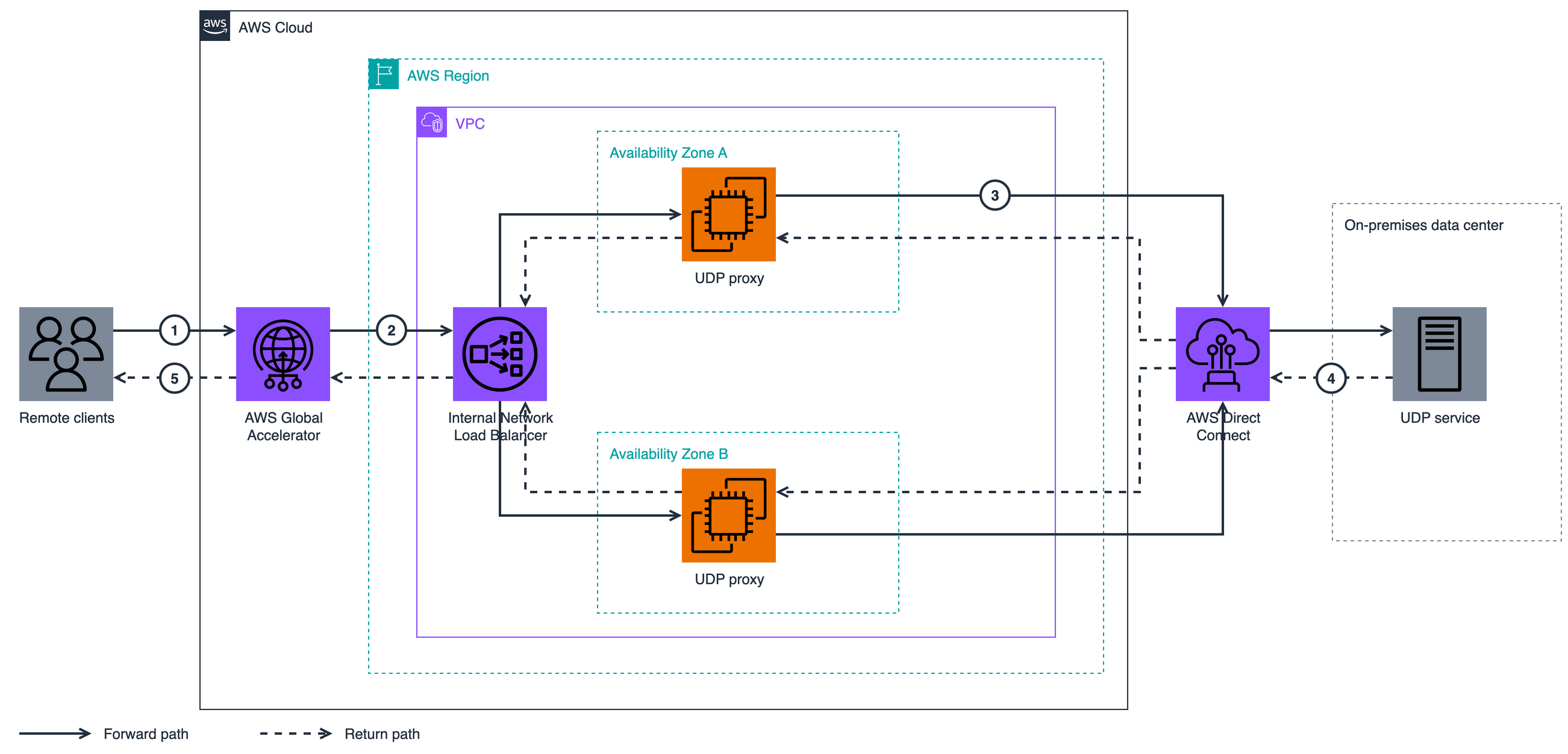
Figure 2: UDP proxy re-origination architecture
Figure 2 depicts the following data flow:
1: A client datagram arrives at a Global Accelerator anycast IP address.
2: Global Accelerator and the load balancer deliver it to a proxy, client source IP preserved.
3: The proxy rewrites the source to its own VPC private IP and forwards over Direct Connect. This rewrite is the fix.
4: The service replies to that private IP, so replies return to the instance holding the flow’s state.
5: Each hop reverses its translation, and the client receives replies from the Global Accelerator address it contacted.
The walkthrough uses nftables kernel NAT rather than a userspace proxy. Kernel NAT forwards packets without handing them to a program, which keeps per-packet overhead low, and it lets the health check test the service instead of the proxy.
Implementing the UDP proxy
The walkthrough has five steps. Confirm the prerequisites first.
Prerequisites
- A Global Accelerator standard accelerator, and an internal Network Load Balancer with a UDP or TCP_UDP listener and a security group. Global Accelerator needs it to preserve client IP addresses, and it can only be attached at creation, so a load balancer without one must be recreated.
- An internet gateway on the VPC, which Global Accelerator requires even for private-subnet endpoints
- Connectivity to the on-premises network over Direct Connect or AWS Site-to-Site VPN, with routes to the service’s subnet and a return route to the VPC CIDR. Either can reach the VPC directly or through AWS Transit Gateway or AWS Cloud WAN. This post calls that connection the hybrid path. The proxies are in the VPC, so the transit gateway preservation restriction does not apply.
- Permissions to launch EC2 instances and modify target groups, security groups, and network access control lists (network ACLs)
- A way to run commands on the proxies, such as Session Manager, a capability of AWS Systems Manager, and outbound access for the nftables install
Replace these placeholders with your values:
| Placeholder | Meaning |
|---|---|
<SERVICE_IP> |
IP address of the on-premises service |
<SERVICE_PORT> |
UDP port it listens on |
<HEALTH_CHECK_PORT> |
TCP port it answers on, often 443 |
<PROXY_PRIVATE_IP> |
Each EC2 proxy’s own private IP |
<PROXY_PRIVATE_IP_A> |
EC2 proxy A’s private IP |
<PROXY_PRIVATE_IP_B> |
EC2 proxy B’s private IP |
<TARGET_GROUP_ARN> |
Target group ARN |
<VPC_CIDR> |
VPC CIDR block |
<INTERFACE_NAME> |
Interface on the on-premises service host |
Step 1: Launch the proxy instances
Launch one Amazon Linux 2023 instance in each private subnet the load balancer uses. Kernel NAT is light on CPU, so size against the baseline network bandwidth figure rather than the “up to” burst figure, because they carry every session’s traffic continuously.
Every packet crossing the proxy’s interface carries the proxy’s own IP as source or destination, so leave SourceDestCheck enabled. Most forwarding instances require it off, which invites turning it off here by mistake.
Step 2: Configure forwarding and kernel NAT
On each proxy, turn on IP forwarding persistently:
sudo tee /etc/sysctl.d/99-udp-proxy.conf << 'EOF'
net.ipv4.ip_forward = 1
EOF
sudo sysctl --system
Install nftables and define the ruleset. The first rule rewrites the destination of inbound service traffic (DNAT); the second forwards the health check. The masquerade rule is the fix, rewriting the source of everything heading to the service to the proxy’s private IP so replies come back inside the VPC:
sudo dnf install -y nftables

sudo tee /etc/nftables/udp-proxy.nft << 'EOF'
table ip udp_proxy {
  chain prerouting {
    type nat hook prerouting priority dstnat; policy accept;
    ip daddr <PROXY_PRIVATE_IP> udp dport <SERVICE_PORT> dnat to <SERVICE_IP>:<SERVICE_PORT>
    ip daddr <PROXY_PRIVATE_IP> tcp dport <HEALTH_CHECK_PORT> dnat to <SERVICE_IP>:<HEALTH_CHECK_PORT>
  }
  chain postrouting {
    type nat hook postrouting priority srcnat; policy accept;
    ip daddr <SERVICE_IP> masquerade
  }
}
EOF

echo 'include "/etc/nftables/udp-proxy.nft"' | sudo tee -a /etc/sysconfig/nftables.conf
sudo systemctl enable --now nftables
Verify with sudo nft list ruleset. The ruleset is IPv4; for dual stack, add an ip6 table and set net.ipv6.conf.all.forwarding.
Forwarded flows consume connection-tracking entries, so raise the table size and UDP stream timeout:
sudo tee -a /etc/sysctl.d/99-udp-proxy.conf << 'EOF'
net.netfilter.nf_conntrack_max = 262144
net.netfilter.nf_conntrack_udp_timeout_stream = 180
EOF
sudo sysctl --system
Step 3: Configure security groups and network ACLs
Security groups are evaluated against the real client IP. Packets arrive with the client’s public IP as source, so a rule scoped to the VPC CIDR drops them all. Allow inbound <SERVICE_PORT> (UDP) from your client ranges and <HEALTH_CHECK_PORT> (TCP) from the VPC CIDR. The instances have no public IP, so a wide range does not expose them.
The proxy subnet’s network ACLs must allow ephemeral ports both ways, because network ACLs are stateless. Inbound covers the service’s replies returning to the proxy’s source-NAT port; outbound covers replies to clients and health checks. Allow 1024-65535 inbound and outbound. Outbound-only is a common miss.
Confirm the proxy subnets’ route tables reach the service’s subnet through the hybrid path. If it uses a transit gateway, see Further considerations.
Step 4: Register the proxies and fix the health check
Register the proxies by private IP (instance IDs cannot join an ip target group), then deregister the on-premises target:
aws elbv2 register-targets --target-group-arn <TARGET_GROUP_ARN> \
  --targets Id=<PROXY_PRIVATE_IP_A>,Port=<SERVICE_PORT> Id=<PROXY_PRIVATE_IP_B>,Port=<SERVICE_PORT>

# Existing deployment: remove the on-premises target. Skip for a new target group.
aws elbv2 deregister-targets --target-group-arn <TARGET_GROUP_ARN> \
  --targets Id=<SERVICE_IP>,Port=<SERVICE_PORT>
UDP target groups require a TCP, HTTP, or HTTPS health check; point it at <HEALTH_CHECK_PORT>. Here the kernel NAT design pays off: with no process listening on the proxy, the service answers the probe, so healthy proves the whole path. A userspace proxy would report healthy even with the service down. Where the service speaks HTTP(S), prefer an HTTPS check with a path.
Confirm both report healthy:
aws elbv2 describe-target-health --target-group-arn <TARGET_GROUP_ARN>
Step 5: Verify end to end
On the on-premises system, confirm traffic arrives from a VPC private address:
sudo tcpdump -n -i any "udp port <SERVICE_PORT> and src net <VPC_CIDR>"
On a client, confirm return traffic is sourced from the Global Accelerator IP address, using a packet capture. That is the cleanest proof of the return path, because the client discards replies from any other address.
Then confirm at the application layer that the session uses UDP, because a TCP fallback hides a broken path behind a degraded session. Check the negotiated transport in the client’s session statistics. For IPsec, confirm that security associations are established (show crypto ikev2 sa on Cisco IOS XE).
If verification fails and the service runs on a virtual machine, TX checksum offloading can produce UDP replies that the proxy discards. Turn it off with ethtool --offload <INTERFACE_NAME> tx off and make it persistent; driver and kernel upgrades reset it.
Cleanup
For a test deployment, restore the original target registrations, terminate the proxies, and remove the security group and network ACL entries you added.
Further considerations
The client IP is not visible at the service. All sessions arrive from the proxy private IPs, and UDP has no equivalent of Proxy Protocol v2. Check the service for per-source-IP rate limits and geo policies, which now see every user as one client.
Concurrency runs out before bandwidth. The source rewrite maps every client onto one address, so concurrent flows are bounded by source ports, roughly 28,000 per proxy by default. Watch nf_conntrack_count and the Elastic Network Adapter conntrack_allowance_exceeded counter, not throughput.
Availability follows the AZs. Each proxy holds the connection state for its own flows, so adding or removing one rehashes the target set and drops in-flight sessions. Test a zone loss before relying on failover.
If the hybrid path uses a transit gateway, give its VPC attachment a subnet in every proxy AZ. Instances in a zone without an attachment subnet cannot reach it, and their traffic blackholes silently. Appliance mode is neither needed nor a fix: the source rewrite makes each proxy the addressed endpoint.
Two designs remove the need for a proxy. Terminate the protocol in-Region, where an EC2 target is a native ENI; for IPsec that usually means the vendor’s virtual appliance. Or use a TCP-only target group, where preserve_client_ip.enabled can be turned off so out-of-VPC targets respond, which UDP rules out.
Conclusion
When a Network Load Balancer forwards UDP to a target outside its VPC, every signal can look healthy while the architecture cannot work. Preservation is locked on, the return path needs the target’s interface inside the VPC, and no routing change substitutes for that. One small EC2 proxy per AZ, running kernel NAT, makes the target an in-VPC ENI, the return path symmetric, and the health check end-to-end.
If you are putting AWS in front of an on-premises UDP service, plan for the proxy from the start. To try it, work through the five steps in a test account, then use the Further reading links to confirm the constraints against the documentation.
Further reading
- Edit target group attributes for your Network Load Balancer
- Target groups for your Network Load Balancers
- Requirements for endpoints with client IP address preservation
- Preserving client IP address with Proxy protocol v2 and Network Load Balancer, the TCP equivalent
About the author

Tracy Honeycutt
Tracy Honeycutt is a Solutions Architecture Manager at AWS, based in Atlanta, Georgia. Tracy helps customers accelerate migrations, modernize workloads, and adopt new ways of working in the cloud. A networking specialist with a particular interest in DNS and hybrid connectivity, Tracy especially enjoys working with customers early in their cloud journey.