Streaming platforms can automate content refresh with Amazon CloudFront cache tags to keep large content catalogs fresh. Content freshness is critical. Rights windows expire, live events transition to video on demand (VOD), and encoding configurations change. In each case, viewers must see the updated content within seconds, not minutes or hours. Until recently, the available invalidation tools made this difficult. Operators had to enumerate URL paths in custom scripts, use wildcard invalidations that purge more than intended, or wait for content to expire at its Time to Live (TTL).
With CloudFront invalidation by cache tag, you can group cached objects by semantic tags and invalidate them precisely with a single API call. With Amazon EventBridge and AWS Lambda, you can build a fully automated pipeline that detects content lifecycle events and triggers targeted cache refreshes. No operator intervention is required.
This post walks through the architecture and implementation of an event-driven content refresh pipeline for media workflows. You will learn how to:
- Design a multidimensional tagging strategy for streaming content
- Tag cached video assets at the origin using Amazon Simple Storage Service (Amazon S3) metadata (VOD) and Lambda@Edge (live or dynamic origins)
- Configure EventBridge rules for common streaming lifecycle events
- Build a Lambda function that executes precision invalidations automatically in response to content events
The challenge of path-based validation and wildcards
Consider a streaming platform delivering 10,000 titles across multiple territories, with an adaptive bitrate (ABR) ladder producing HTTP Live Streaming (HLS) and Dynamic Adaptive Streaming over HTTP (DASH) manifests, initialization segments, and media segments per title. A typical content change scenario:
- Rights window expiry – A license deal expires at midnight in Germany. At 200 titles, 8 renditions, and 2 formats, 3,200 cached objects need immediate removal to meet compliance service level agreements (SLAs).
- Live-to-VOD transition – A live World Cup match ends and gets repackaged as VOD. Old live manifests must be flushed so players fetch the new VOD structure.
- Encoder configuration update – A new bitrate rung is added to the ABR ladder, so cached manifests reference renditions that no longer exist. This causes player errors.
With path-based invalidation, each scenario requires enumerating hundreds or thousands of URL paths. The alternative is to issue wildcards, such as /content/de/*. Wildcards purge unrelated content and collapse your cache hit ratio. Neither approach scales, and both require manual triggering or brittle script maintenance.
Solution overview
The automated content refresh pipeline consists of three layers:
- Tagging at ingest – Your origin attaches cache tags to objects when CloudFront fetches them, using an HTTP response header (
x-amz-meta-cache-tag) with comma-separated tag values.
- Event detection – EventBridge receives content lifecycle events from your content management system (CMS), rights management system, or media processing pipeline.
- Automated invalidation – A Lambda function, triggered by EventBridge, calls the CloudFront CreateInvalidation API with the relevant cache tag(s).
The following diagram illustrates the end-to-end architecture.
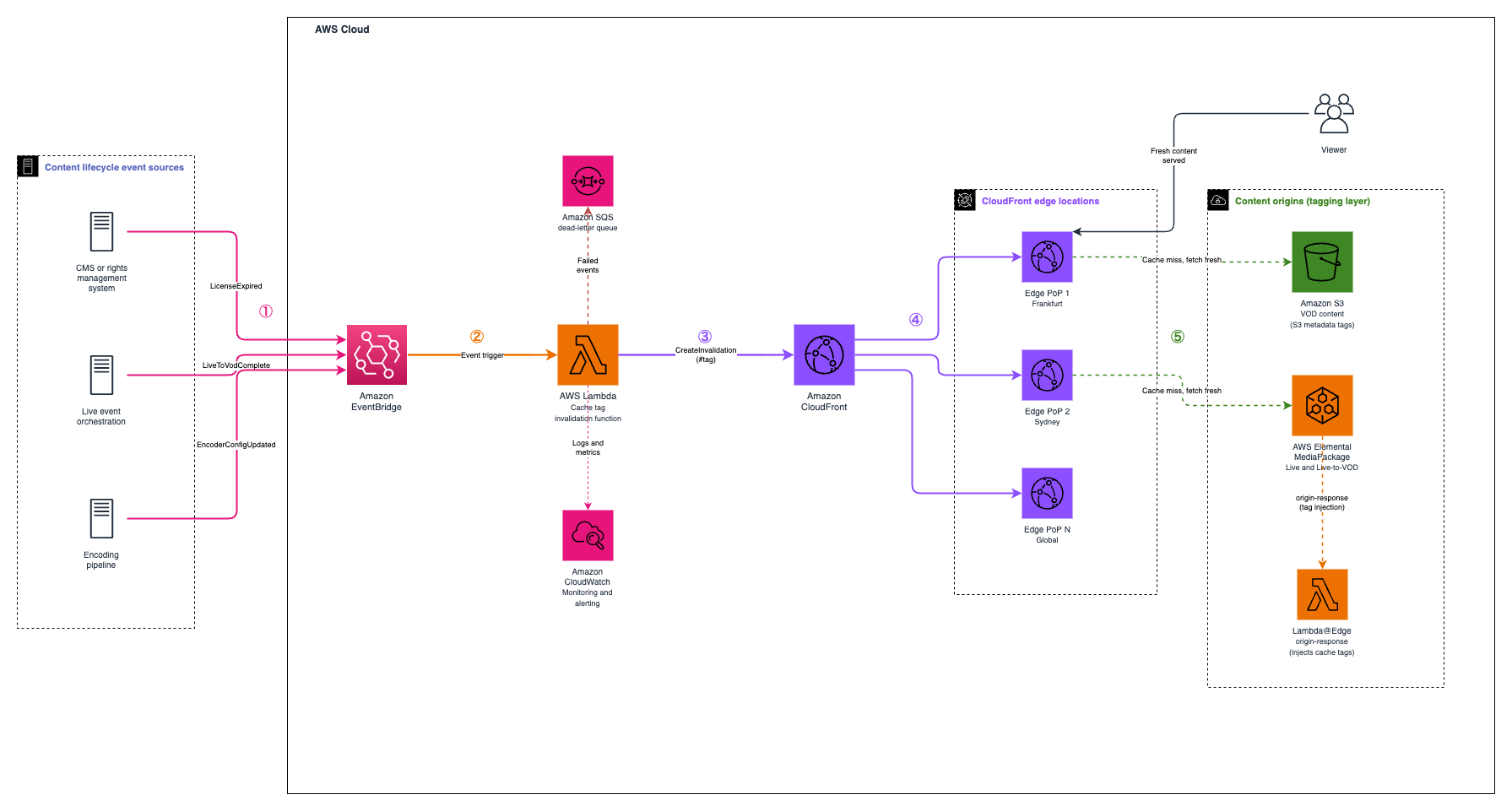
Figure 1: Content refresh pipeline architecture
Because cache tag invalidations typically take effect within seconds, viewers see fresh content shortly after the source event fires. The end-to-end pipeline, from event publication to cache purge, generally completes within seconds. Actual timing depends on your event source, Lambda function, and CloudFront propagation, so measure it in your own environment.
How CloudFront cache tags work
Before diving into the implementation, here’s a quick explanation of the cache tag mechanism:
- Configure your distribution – Add a CacheTagConfig specifying the HTTP header name your origin uses to return cache tags (default:
x-amz-meta-cache-tag).
- Tag objects at the origin – When CloudFront fetches an object from your origin, the origin includes the configured header with comma-separated tag values. CloudFront stores these tags alongside the cached object.
- Invalidate by tag – Use the CreateInvalidation API with the # prefix to invalidate all objects carrying a specific tag, regardless of their URL path.
Origin response header example:
HTTP/1.1 200 OK
Content-Type: application/dash+xml
x-amz-meta-cache-tag: event:wc2026-match-12,format:dash,territory:de,channel:sports-hd
Cache-Control: max-age=3600
Command line interface (CLI) invalidation example:
aws cloudfront create-invalidation \
  --distribution-id E1A2B3C4D5E6F7 \
  --paths "#event:wc2026-match-12"
Key constraints to be aware of:
- Maximum 50 tags per cached object (additional tags are ignored)
- Tags are case-insensitive and limited to 256 characters each
- Tags must contain only ASCII visible characters (33-126), with no spaces or commas
- Wildcards aren’t supported for tag-based invalidation
- The first 1,000 invalidation paths or tags per month are free; additional paths cost $0.005 each
Prerequisites
To follow along with this walkthrough, you need:
- An Amazon CloudFront distribution with cache tag invalidation enabled
- An origin serving video content (Amazon S3 for VOD, or AWS Elemental MediaPackage for live or live-to-VOD)
- An EventBridge event bus (default or custom)
- A Lambda function with
cloudfront:CreateInvalidation permissions
- Familiarity with media streaming concepts (ABR, HLS or DASH manifests, live-to-VOD)
Enable cache tag invalidation on your distribution
Enable the feature on your CloudFront distribution and specify the response header that carries your tags.
On the console:
- Open the CloudFront console and select your distribution.
- On the General tab, choose Edit settings.
- Turn on Use cache tags for cache invalidation.
- For Header to use for cache tags, enter
x-amz-meta-cache-tag (this matches Amazon S3 user-defined metadata with key cache-tag).
- Save your changes.
Using CloudFormation:
Resources:
  StreamingDistribution:
    Type: AWS::CloudFront::Distribution
    Properties:
      DistributionConfig:
        Enabled: true
        Comment: "Streaming distribution with cache tag support"
        CacheTagConfig:
          HeaderName: x-amz-meta-cache-tag
        DefaultCacheBehavior:
          TargetOriginId: VodOrigin
          ViewerProtocolPolicy: redirect-to-https
          CachePolicyId: 658327ea-f89d-4fab-a63d-7e88639e58f6
Design your media tagging strategy
A well-designed tagging strategy is the foundation of the pipeline. For streaming platforms, we recommend a multidimensional approach where each cached object carries several tags representing its content relationships.
The following table lists the recommended taxonomy for media workloads.
| Tag pattern |
Example |
Invalidation scenario |
series:<id> |
series:stranger-things |
Metadata update for entire series |
season:<id> |
season:st-s4 |
New episode added, refresh season manifests |
event:<id> |
event:wc2026-match-12 |
Live-to-VOD transition |
license:<deal> |
license:deal-abc |
Rights window expiry |
territory:<code> |
territory:de |
Geographic content restriction |
format:<type> |
format:dash, format:hls |
Protocol-specific refresh |
channel:<name> |
channel:sports-hd |
Encoder configuration change |
Assign multiple tags per object. For example, a DASH manifest for a German-licensed sports event would carry:
event:wc2026-match-12,format:dash,territory:de,channel:sports-hd
This gives you the flexibility to invalidate by any dimension—purge all German content for a rights expiry or flush only DASH manifests after an encoder change without affecting HLS caches.
To align with best practice, use colons for namespacing (entity:id), keep tags lowercase for consistency, and use hyphens for multiword values (category:live-events). Document your conventions early so your team maintains consistency as the catalog grows.
Tag cached objects at the origin
You have two options for tagging cached objects at the origin. How you attach cache tags depends on where your content originates. Static VOD assets stored in Amazon S3 can carry tags as object metadata that CloudFront reads on fetch, while live and dynamic origins that can’t set custom metadata headers can have tags injected at the edge with a Lambda@Edge function. The two options that follow cover both cases, and you can combine them in a hybrid catalog that mixes VOD and live content.
Amazon S3 origin (VOD workflows)
For VOD content stored in Amazon S3, add cache tags as S3 object metadata. When CloudFront fetches the object, S3 returns the metadata as an HTTP response header (x-amz-meta-cache-tag), which CloudFront stores alongside the cached object:
# Upload a VOD manifest with cache tags
aws s3 cp manifest.mpd s3://my-vod-bucket/titles/title-123/dash/manifest.mpd \
  --metadata cache-tag="series:breaking-bad,season:5,format:dash,license:deal-xyz,territory:de"
For bulk tagging at ingest time, integrate this into your transcoding pipeline. AWS Elemental MediaConvert emits a completion event when a job finishes. A post-processing Lambda function can then apply tags from your content catalog metadata:
import boto3

s3 = boto3.client('s3')

def tag_vod_assets(bucket, prefix, tags):
    """Apply cache tags to all objects under a content prefix."""
    paginator = s3.get_paginator('list_objects_v2')

    for page in paginator.paginate(Bucket=bucket, Prefix=prefix):
        for obj in page.get('Contents', []):
            # Copy object to itself with new metadata (S3 metadata is immutable)
            s3.copy_object(
                Bucket=bucket,
                Key=obj['Key'],
                CopySource={'Bucket': bucket, 'Key': obj['Key']},
                Metadata={'cache-tag': ','.join(tags)},
                MetadataDirective='REPLACE'
            )
Lambda@Edge (live and dynamic origins)
For live streaming origins such as MediaPackage or AWS Elemental MediaTailor, the origin can’t inherently set custom metadata headers. Use a Lambda@Edge function triggered on origin-response to inject tags dynamically based on the request URI:
import json

def lambda_handler(event, context):
    response = event['Records'][0]['cf']['response']
    request = event['Records'][0]['cf']['request']
    uri = request['uri']

    # Extract content identifiers from URI path
    # Example URI: /out/v1/sports-hd/dash/index.mpd
    parts = uri.strip('/').split('/')
    tags = []

    # Tag by channel (from path segment)
    if len(parts) >= 3:
        channel = parts[2]
        tags.append(f'channel:{channel}')

    # Tag by format
    if uri.endswith('.mpd'):
        tags.append('format:dash')
    elif uri.endswith('.m3u8'):
        tags.append('format:hls')

    # Tag by content type (manifests vs. segments)
    if 'index' in uri or 'manifest' in uri or uri.endswith('.mpd') or uri.endswith('.m3u8'):
        tags.append('type:manifest')
    else:
        tags.append('type:segment')

    # Add event tags from custom origin headers if available
    custom_headers = request.get('origin', {}).get('custom', {}).get('customHeaders', {})
    if 'x-event-id' in custom_headers:
        event_id = custom_headers['x-event-id'][0]['value']
        tags.append(f'event:{event_id}')

    # Set the cache tag header
    if tags:
        response['headers']['x-amz-meta-cache-tag'] = [{
            'key': 'x-amz-meta-cache-tag',
            'value': ','.join(tags)
        }]

    return response
Associate this function with your CloudFront distribution’s origin-response event for the relevant cache behaviors.
For MediaPackage live origins, you can also pass event identifiers as CloudFront origin custom headers, so the Lambda@Edge function can tag content with event-specific identifiers instead of parsing complex URI patterns.
To make event identifiers available to the Lambda@Edge function, set an origin custom header on the CloudFront distribution. The following example adds an x-event-id header to the origin configuration:
Origins:
- Id: MediaPackageOrigin
DomainName: <your-mediapackage-endpoint>
CustomOriginConfig:
OriginProtocolPolicy: https-only
OriginCustomHeaders:
- HeaderName: x-event-id
HeaderValue: wc2026-match-12
CloudFront forwards this header to the origin on every request. The Lambda@Edge origin-response function reads it and adds an event:<id> cache tag, so you can invalidate an entire event with a single tag. Update the header value (or set it per cache behavior) when the live event changes.
Configure EventBridge rules for content lifecycle events
Amazon EventBridge acts as the trigger layer, listening for content lifecycle events and routing them to your invalidation function. The following examples cover three common streaming scenarios.
Rights window expiry
Your rights management system publishes an event when a license expires:
{
  "source": ["com.myplatform.rights"],
  "detail-type": ["LicenseExpired"],
  "detail": {
    "license_id": "deal-xyz",
    "territory": "de",
    "title_count": 200,
    "effective_time": "2026-07-01T00:00:00Z"
  }
}
EventBridge rule pattern:
{
  "source": ["com.myplatform.rights"],
  "detail-type": ["LicenseExpired"]
}
Live-to-VOD transition complete
When MediaPackage completes a harvest job (live-to-VOD conversion), or your orchestration layer signals completion:
{
  "source": ["com.myplatform.live"],
  "detail-type": ["LiveToVodComplete"],
  "detail": {
    "event_id": "wc2026-match-12",
    "vod_asset_id": "asset-456",
    "channel": "sports-hd"
  }
}
EventBridge rule pattern:
{
"source": ["com.myplatform.live"],
"detail-type": ["LiveToVodComplete"]
}
Encoder configuration update
When your encoding pipeline changes ABR ladder settings:
{
  "source": ["com.myplatform.encoding"],
  "detail-type": ["EncoderConfigUpdated"],
  "detail": {
    "channel": "sports-hd",
    "change_type": "abr_ladder_modified",
    "added_renditions": ["1080p60"]
  }
}
EventBridge rule pattern:
{
"source": ["com.myplatform.encoding"],
"detail-type": ["EncoderConfigUpdated"]
}
Build the invalidation Lambda function
The Lambda function receives EventBridge events and translates them into CloudFront cache tag invalidations. A single function handles all event types by mapping event detail fields to the appropriate cache tag:
import boto3
import hashlib
import time
import json
import os

cloudfront = boto3.client('cloudfront')

DISTRIBUTION_ID = os.environ['DISTRIBUTION_ID']

def lambda_handler(event, context):
    detail_type = event.get('detail-type', '')
    detail = event.get('detail', {})

    # Map event type to cache tag(s)
    tags = []

    if detail_type == 'LicenseExpired':
        license_id = detail.get('license_id')
        territory = detail.get('territory')
        if license_id:
            tags.append(f'#license:{license_id}')
        if territory:
            tags.append(f'#territory:{territory}')

    elif detail_type == 'LiveToVodComplete':
        event_id = detail.get('event_id')
        if event_id:
            tags.append(f'#event:{event_id}')

    elif detail_type == 'EncoderConfigUpdated':
        channel = detail.get('channel')
        if channel:
            tags.append(f'#channel:{channel}')
            tags.append('#type:manifest')

    if not tags:
        print(f'No tags derived from event: {detail_type}')
        return {'statusCode': 200, 'body': 'No invalidation needed'}

    # Create the invalidation with a unique caller reference
    caller_reference = (
        f'{detail_type}-'
        f'{hashlib.md5(json.dumps(detail, sort_keys=True).encode()).hexdigest()}-'
        f'{int(time.time())}'
    )

    response = cloudfront.create_invalidation(
        DistributionId=DISTRIBUTION_ID,
        InvalidationBatch={
            'Paths': {
                'Quantity': len(tags),
                'Items': tags
            },
            'CallerReference': caller_reference
        }
    )

    invalidation_id = response['Invalidation']['Id']
    print(f'Created invalidation {invalidation_id} for tags: {tags}')

    return {
        'statusCode': 200,
        'body': json.dumps({
            'invalidation_id': invalidation_id,
            'tags': tags,
            'event_type': detail_type
        })
    }
AWS Identity and Access Management (IAM) policy for the Lambda function:
{
  "Version": "2012-10-17",
  "Statement": [{
    "Effect": "Allow",
    "Action": "cloudfront:CreateInvalidation",
    "Resource": "arn:aws:cloudfront::123456789012:distribution/E1A2B3C4D5E6F7"
  }]
}
Attach this Lambda function as the target for each of the EventBridge rules configured in Configure EventBridge rules for content lifecycle events.
Verify the pipeline end-to-end
To validate the complete flow:
1. Cache an object with tags. Request the content through CloudFront and confirm that the response includes the cache tag header. On the first request, CloudFront fetches the object from the origin, so the x-cache header reads Miss from cloudfront and the response carries the x-amz-meta-cache-tag header. On later requests, CloudFront serves the object from cache, so the x-cache header reads Hit from cloudfront.
# First request - cache miss, tag header present

               curl -I https://d1234567890.cloudfront.net/titles/title-123/dash/manifest.mpd

               # Look for: x-amz-meta-cache-tag: series:breaking-bad,season:5,format:dash,...

               # Look for: x-cache: Miss from cloudfront
2. Publish a test event. Send a test event to EventBridge:
aws events put-events --entries '[{

                 "Source": "com.myplatform.rights",

                 "DetailType": "LicenseExpired",

                 "Detail": "{\"license_id\": \"deal-xyz\", \"territory\": \"de\"}"

                 }]'
3. Confirm invalidation. Check Amazon CloudWatch Logs for the Lambda function output showing the invalidation ID, then list invalidations to verify:
4. Verify the cache purge. Request the same content again after the invalidation completes. Because the tagged object was purged from every edge location, CloudFront fetches it from the origin again, so the x-cache header reads Miss from cloudfront. This confirms that the tag-based invalidation removed the object from the cache.
5. Measure timing. The figures in the next section are illustrative estimates, not benchmarks. In this example, the pipeline typically completes within seconds, spanning EventBridge delivery, Lambda execution, and CloudFront propagation. Measure the exact latency in your own environment, because it depends on your event source, function, and traffic.
Scenario walkthroughs
The following walkthroughs trace how the pipeline responds to three common content lifecycle events, from the source event to the moment viewers see fresh content: enforcing a rights window expiry, flushing a live stream as it transitions to VOD, and refreshing manifests after an encoder configuration change. The timings shown are illustrative estimates that depend on your event source, Lambda function, and CloudFront propagation, so measure them in your own environment.
Automated rights window enforcement
A licensing deal for 200 German-language titles expires at midnight CET. The following table traces the sequence of events, from the rights management system publishing the expiry event to CloudFront purging the affected objects and viewers receiving an access-denied response for the expired content.
| Time |
Action |
| T+0s |
Rights management system publishes LicenseExpired event with license:deal-xyz and territory:de |
| T+1s |
EventBridge delivers event to Lambda |
| T+2s |
Lambda calls CreateInvalidation with tags #license:deal-xyz and #territory:de |
| T+7s |
CloudFront edge locations globally have purged objects carrying either tag |
| T+8s |
Next viewer request returns 403 (origin now returns access denied for expired content) |
In this example, more than 3,200 cached objects are invalidated with a two-line API call, with no operator intervention and no impact to non-German content. The invalidation is completed within seconds. Measure the exact timing in your own environment.
Live event cache flush upon broadcast completion
A World Cup match ends, and the continuously updating live manifest must be replaced by the packaged VOD asset. The following table traces the sequence, from MediaPackage completing the harvest job to players fetching the new VOD manifest so the transition is seamless.
| Time |
Action |
| T+0s |
MediaPackage harvest job completes, orchestration publishes LiveToVodComplete |
| T+1s |
Lambda invalidates #event:wc2026-match-12 |
| T+6s |
The cached live manifests and segments for this event are purged |
| T+7s |
Players fetch the new VOD manifest from the origin, so the transition is smooth |
Players never see a stale live manifest pointing to a stream that no longer exists.
ABR manifest refresh after encoding changes
A new 1080p60 rendition is added to the sports-hd channel.
| Time |
Action |
| T+0s |
Encoding pipeline publishes EncoderConfigUpdated for channel sports-hd |
| T+1s |
Lambda invalidates #channel:sports-hd and #type:manifest |
| T+6s |
Cached manifests for the channel are purged (segments remain cached) |
| T+7s |
Players fetch updated manifests referencing the new rendition |
As a result, only manifests are purged. Media segments (which haven’t changed) remain cached, preserving hit ratio and avoiding unnecessary origin load.
Operational comparison
The following table compares three approaches to cache invalidation for streaming content.
|
Path wildcards (manual) |
URL enumeration (scripted) |
Cache tag pipeline (this post, timings illustrative) |
| Trigger |
Operator runs script |
Cron job or manual |
Event-driven, automatic |
| Precision |
Over-purges unrelated content |
Precise but fragile |
Precise and decoupled from URLs |
| Cache hit ratio impact |
Significant drop |
Minimal |
Minimal |
| Rights compliance SLA |
Minutes (human response time) |
Minutes (script execution) |
Seconds (event to purge, illustrative) |
| URL structure coupling |
Tightly coupled |
Tightly coupled |
Fully decoupled |
| Operational overhead |
High (manual runbooks) |
Medium (script maintenance) |
Low (set and forget) |
| Scalability |
Degrades with catalog size |
Degrades with URL complexity |
Constant for most catalog sizes |
Cost analysis
The pipeline uses pay-per-use pricing across all components, as outlined in the following table.
| Component |
Pricing |
Monthly cost (500 events per day) |
| CloudFront invalidations |
First 1,000 paths per tags free; $0.005 per additional |
~$70 (15,000 tags) |
| EventBridge |
$1.00 per million events |
~$0.015 (15,000 events) |
| Lambda |
Standard per-invocation plus duration |
~$0.05 (15,000 × 200 ms) |
| Total automation overhead |
– |
~$70.07 per month |
The majority of cost comes from CloudFront invalidation pricing, which is the same cost you would pay issuing invalidations manually. The automation layer (EventBridge and Lambda) adds less than $0.10 per month.
To optimize cost for high-volume scenarios, batch multiple tag invalidations into a single CreateInvalidation call. CloudFront counts each tag as one invalidation path, so batching doesn’t reduce per-tag cost, but it does reduce Lambda invocations and API calls.
Production hardening considerations
Before you run this pipeline in production, harden it against failures, duplicate events, and unintended disclosure of your tagging scheme. The following practices cover error handling and retries, idempotency, monitoring and alerting, and scaling.
For error handling and retries, add dead-letter queues (DLQs) to your EventBridge rules and Lambda function to capture failed invalidations. Configure Lambda retry behavior with maxRetryAttempts and use a DLQ for events that exhaust retries.
The CallerReference field in the invalidation API provides natural idempotency. If the same event is delivered twice (EventBridge provides at-least-once delivery), use a deterministic CallerReference derived from the event content to avoid duplicate invalidations.
Monitor the pipeline and alert on failures so that a missed invalidation doesn’t go unnoticed, using the following signals:
- Amazon CloudWatch metrics – Monitor Lambda.Invocations, Lambda.Errors, and custom metrics for invalidation counts per event type.
- CloudFront invalidation status – Poll GetInvalidation API or monitor using CloudWatch for invalidation completion times.
- Alarm on failures – Set a CloudWatch alarm on the DLQ message count to alert operations if invalidations are failing.
By default, CloudFront forwards the x-amz-meta-cache-tag header to viewers. To suppress it (and avoid inadvertent disclosure of internal tagging to clients), attach a response headers policy that removes the header before responses reach viewers.
Keep the following scaling limits in mind as your event volume and catalog grow:
- CloudFront processes up to 50 tags per cached object. Design your taxonomy to stay within this limit.
- For very high-volume scenarios (thousands of events per minute), batch tags within a short aggregation window. To do this, add an Amazon Simple Queue Service (Amazon SQS) queue between EventBridge and Lambda.
Cleaning up
To avoid incurring future costs, remove the resources you created for this walkthrough when you no longer need them:
- Delete the Lambda function and its execution role.
- Delete the EventBridge rules you created for the content lifecycle events.
- Remove any Lambda@Edge function associations from your CloudFront distribution, then delete the function after its replicas are removed.
- Delete the test objects you uploaded to your S3 bucket.
- Turn off cache tag invalidation on your CloudFront distribution if you no longer need it or delete the distribution if it was created only for this walkthrough.
Conclusion
With Amazon CloudFront cache tags, Amazon EventBridge, and AWS Lambda, streaming platforms can automate content freshness across their tagged catalog. The pipeline reacts to content lifecycle events in real time. It issues precision invalidations that preserve cache efficiency and helps meet compliance SLAs measured in seconds.
This architecture eliminates the operational burden of maintaining invalidation scripts, decouples cache management from URL structure, and applies the same tags to each object as your catalog grows. As your content library grows, the automation logic stays the same. Only the tags change.
To get started:
- Enable cache tag invalidation on your CloudFront distribution.
- Instrument your origins with tags (S3 metadata for VOD and Lambda@Edge for live).
- Wire your first EventBridge rule (start with rights expiry, which is the highest compliance risk).
- Expand to additional lifecycle events incrementally.
Further reading