AWS Big Data Blog
Building an LLM-powered DAG failure analysis plugin for Amazon MWAA
Apache Airflow has become the orchestration backbone for data pipelines across industries. But as those pipelines grow to hundreds of directed acyclic graphs (DAGs) spanning services like AWS Glue, Amazon EMR, Amazon Athena, and Amazon Redshift, debugging a single task failure turns into a significant operational challenge. When a task fails, data engineers sift through logs, cross-reference DAG configurations, and analyze error messages to find the root cause, delaying pipeline service level agreements (SLAs) and impacting team productivity.
In this post, we show you how to build a custom Apache Airflow plugin that integrates with Amazon Bedrock to automatically analyze DAG task failures and provide actionable diagnostic insights. The plugin deploys to Amazon Managed Workflows for Apache Airflow (Amazon MWAA) and provides AI-powered root cause analysis on demand.
The complete source code for this solution is available in the sample-aws-mwaa-llm-powered-plugin GitHub repository. Clone the repository and follow along as we explain the design decisions throughout this post.
Solution overview
Apache Airflow is a widely adopted open source platform for programmatically authoring, scheduling, and monitoring complex data pipelines. Teams use Airflow to orchestrate extract, transform, and load (ETL) processes, machine learning workflows, and data lake management across industries.
Amazon MWAA is a managed service that makes it straightforward to run Apache Airflow on AWS without the operational burden of managing the underlying infrastructure. With Amazon MWAA, you can focus on authoring workflows and business logic while AWS handles provisioning, patching, scaling, and securing your Airflow environments.
The solution uses the following AWS services:
- Amazon Managed Workflows for Apache Airflow (Amazon MWAA) – Hosts the Airflow environment and plugin.
- Amazon Bedrock – Provides foundation model (FM) inference (Anthropic Claude) for failure analysis.
- Amazon Simple Storage Service (Amazon S3) – Stores plugin artifacts, DAG files, and operator scripts.
The plugin adds an analysis view directly into your Airflow UI. At a high level, when a task fails and you trigger an analysis, the plugin automatically does the following:
- Retrieves the failed task instance metadata from the Airflow metadata database.
- Collects comprehensive context including task logs, DAG source code, and operator-specific scripts.
- Sends the enriched context to Amazon Bedrock for analysis.
- Returns a structured diagnostic report with root cause identification, step-by-step resolution, and prevention recommendations.
How it works
The preceding four steps happen behind a single Analyze Task action. The following diagram and pipeline show the high-level architecture and how the plugin carries them out.
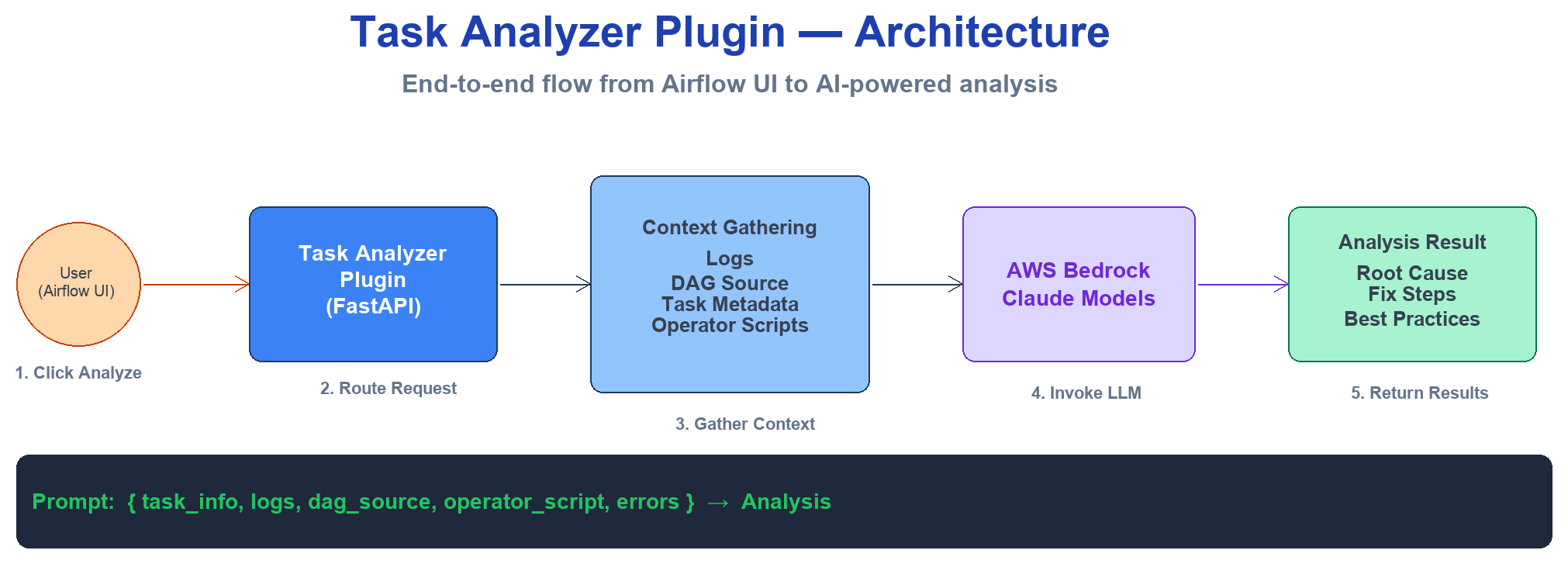
Figure 1: High-level architecture of the LLM-powered task analyzer plugin on Amazon MWAA
The plugin follows a multi-step analysis pipeline:
- User triggers analysis – From the Airflow UI, you select a failed task and choose Analyze Task.
- Context collection – The plugin retrieves task metadata, execution logs, and DAG source code from the Airflow metadata database and Amazon S3.
- Operator-aware enrichment – Based on the operator type, the plugin fetches the actual code or query that failed (for example, a PySpark script from AWS Glue or a SQL query from Amazon Athena).
- Foundation model analysis – The enriched context is sent to Amazon Bedrock, which returns a structured diagnostic report.
- Results presentation – The analysis displays in the Airflow UI with actionable recommendations.
All AWS API calls (Amazon Bedrock, Amazon S3, and AWS Glue) are authenticated through the aws_default Airflow connection. By default on Amazon MWAA, this connection has no static credentials, so boto3 falls back to the environment’s execution role. This means there are no keys to manage or rotate. If you need to call Amazon Bedrock or fetch scripts using a different identity, you can supply those credentials in the aws_default connection. This can be a dedicated IAM role or a cross-account principal, used instead of the execution role.
Operator-aware context collection
A key differentiator of this solution is its ability to understand different Airflow operator types and automatically fetch the associated code or queries. Unlike generic log analyzers, the plugin retrieves the actual code that failed, not just the error message.
The following table summarizes what the plugin fetches for each operator type:
| Operator type | What the plugin fetches | Source |
| GlueJobOperator | PySpark or Python script | Amazon S3 (from the AWS Glue job definition) |
| EmrAddStepsOperator | Spark or Python script | Amazon S3 (from step arguments) |
| EmrServerlessStartJobOperator | Spark script | Amazon S3 (from job driver) |
| AthenaOperator | SQL query | Inline (from operator parameters) |
| RedshiftDataOperator | SQL query | Inline (from operator parameters) |
| BashOperator | Bash command | Inline (from operator parameters) |
| PythonOperator | Python function | DAG source code |
This approach means the foundation model can analyze the actual logic that failed, correlating error messages with specific lines in your code for precise root cause identification.
Prerequisites
Before you begin, make sure that you have the following:
- An Amazon MWAA environment running Apache Airflow 3.x (this walkthrough uses Airflow 3.2). The plugin registers its UI through the FastAPI-based plugin interface (
fastapi_apps) introduced in Airflow 3.x. For setup instructions, see Get started with Amazon MWAA. - Access to Amazon Bedrock with the Anthropic Claude model family enabled in your AWS Region. This walkthrough uses Anthropic Claude, but you can adapt the plugin to work with Amazon Nova or other foundation models by modifying the prompt payload format in
prompts.py. See Model access. - An AWS Identity and Access Management (IAM) execution role for Amazon MWAA with
bedrock:InvokeModelands3:GetObjectpermissions. - An Amazon S3 bucket backing your Amazon MWAA environment with bucket versioning enabled. See Create an Amazon S3 bucket for Amazon MWAA.
- Python 3.10 or later installed locally.
- The AWS Command Line Interface (AWS CLI) configured with appropriate permissions.
Note: In most Regions, you invoke Claude through an inference profile ID (for example, us.anthropic.claude-sonnet-4-5-20250929-v1:0) rather than a bare on-demand model ID. Run aws bedrock list-inference-profiles to confirm a model is ACTIVE before configuring it.
Plugin design
In this section, we explain the plugin design and its key components. The next section walks through deploying it to your Amazon MWAA environment.
Plugin structure
The plugin follows the standard Apache Airflow plugin architecture. The repository is organized as follows:
The repository also includes example DAGs that simulate various failure scenarios across different operator types.
Plugin registration
In Apache Airflow 3.x, the web component of a plugin is registered as a FastAPI application through the fastapi_apps attribute. In task_analyzer_plugin.py, the TaskAnalyzerPlugin class registers the FastAPI app under /task-analyzer and adds a view to the task instance page:
Airflow automatically discovers any AirflowPlugin subclass in the plugins folder. No registration call or configuration change is needed. On Amazon MWAA, the file is delivered inside plugins.zip and extracted to /usr/local/airflow/plugins/.
Analysis engine
The analysis engine is the POST /api/analyze-task endpoint in task_analyzer_plugin.py. When you trigger an analysis, the endpoint performs the following steps:
- Retrieves AWS credentials from the
aws_defaultAirflow connection. To override, edit theaws_defaultconnection in the Airflow UI (Admin > Connections). - Assembles a context dictionary from the request (task metadata, logs, DAG source).
- Enriches the context with an operator-specific script through
fetch_and_add_operator_script. - Builds the prompt using the template in prompts.py.
- Invokes Amazon Bedrock and returns the structured analysis.
Operator script fetching
The process_operator_script function in script_utils.py routes script retrieval based on operator type:
- External scripts (AWS Glue, Amazon EMR) – The plugin calls the AWS Glue API to look up the job definition, then reads the PySpark script from Amazon S3. Amazon EMR handlers follow the same pattern, extracting the script path from the step configuration or job driver.
- Inline scripts (Amazon Athena, Amazon Redshift, BashOperator, PythonOperator, DBTOperator) – The plugin reads the query or command directly from the task’s rendered template fields with no external API call.
The plugin implements smart fetching: for external scripts, it only makes the Amazon S3 API call when the error message contains code-relevant patterns (such as SyntaxError, TypeError, or data type mismatch). Infrastructure errors like timeouts skip the script fetch entirely, minimizing unnecessary API calls.
Prompt engineering
The prompt template in prompts.py provides the foundation model with:
- Task metadata (DAG ID, task ID, run ID, state).
- Error message and execution logs.
- DAG source code.
- Operator-specific script (when available).
The model produces a structured diagnostic report with root cause identification, step-by-step resolution, and prevention recommendations. Model IDs are configurable through Airflow Variables, so you can switch between Claude Sonnet and Claude Opus without redeploying the plugin.
Security measures
Before sending content to Amazon Bedrock, the plugin applies the following safeguards:
- Credential redaction – The
sanitize_scriptfunction removes sensitive patterns (passwords, tokens, access keys) from scripts and logs. - Content truncation – The
truncate_scriptfunction caps content size to stay within model context windows. - Path traversal prevention – The
read_allowlisted_filefunction resolves canonical paths and verifies they reside within allowed base directories before reading any file.
For the full implementation, see script_utils.py.
Optional: PII detection and redaction. The built-in sanitize_script function targets credential patterns. If your logs or scripts might contain personally identifiable information (PII), consider adding a detection pass with Amazon Comprehend before invoking Amazon Bedrock. The DetectPiiEntities API returns the entity types (such as names, email addresses, or account numbers) and their character offsets. You can use these offsets to mask or obfuscate the spans before the context leaves your environment. This adds one API call and cost per analysis, so add it where your compliance requirements call for it. For guidance, see Detecting PII entities.
Deploy the plugin
Follow these steps to deploy the plugin to your Amazon MWAA environment.
Step 1: Clone the repository
Step 2: Package and upload to Amazon S3
Create the plugins.zip archive from the plugins/ directory and upload it to your Amazon MWAA S3 bucket:
Note the VersionId returned. You need it in the next step.
Note: This plugin requires only fastapi and Boto3, both pre-installed on Amazon MWAA for Airflow 3.x. You don’t need a requirements.txt file. Skipping the requirements file avoids package resolution conflicts that are a common cause of failed Amazon MWAA environment updates.
Step 3: Update the Amazon MWAA environment
Update your environment to use the new plugin archive:
The environment restarts automatically. This process typically takes 10–30 minutes. Monitor the status with:
Step 4: Configure the Amazon Bedrock connection
On Amazon MWAA, the aws_default connection exists by default and resolves to your environment’s execution role. In most cases, no action is needed.
To override the Region, edit the aws_default connection in the Airflow UI (Admin > Connections) and set the Extra field to:
Leave login and password empty so the execution role is used.
Step 5: Verify the deployment
After the environment finishes updating, navigate to Admin > Plugins in the Airflow UI. Verify that task_analyzer_plugin appears in the list. The Analyze Task entry is now available from any task instance view.
Test the solution
The repository includes example DAGs that simulate failure scenarios across different operator types. To validate the deployment:
- Copy the dags/ directory contents to your Amazon MWAA S3 bucket’s DAGs folder:
- Wait for Amazon MWAA to sync the DAGs (typically 1–2 minutes).
- In the Airflow UI, trigger one of the test DAGs (for example,
test_aws_sql_operators) and let the intentional failure occur. - Navigate to the failed task instance.
- Choose Analyze Task in the task instance view.
- Review the generated analysis, which includes:
- Root cause identification with file and line references.
- Step-by-step resolution with code examples.
- Prevention recommendations and monitoring suggestions.
The analysis typically completes within 5–10 seconds.
Cost considerations
The primary cost driver for this solution is Amazon Bedrock inference, which is billed by the number of input and output tokens each analysis consumes. Input tokens come from the task logs, DAG source, and operator script sent to the model. Output tokens come from the diagnostic report the model returns. Larger logs and scripts increase input tokens, and the model you select affects the per-token rate. For current per-model rates, see Amazon Bedrock pricing.
To help control cost, the plugin includes a caching mechanism that stores results keyed by a hash of the error context. Repeated analyses of the same failure pattern return cached results without invoking Amazon Bedrock again.
Best practices
When you deploy this solution in production, consider the following:
- IAM least privilege – Grant only
bedrock:InvokeModelfor your chosen model IDs and scopes3:GetObjectto specific bucket paths where your operator scripts reside. For guidance, see Amazon MWAA execution role. - Data sanitization – The plugin redacts credentials and truncates content before sending data to Amazon Bedrock. Store configuration values in AWS Secrets Manager rather than hardcoding them in DAG source files.
- Access control – The plugin’s endpoints are protected by Airflow’s built-in authentication. For DAG-level access management at scale, see Automated tag-based DAG permission management in Amazon MWAA.
- Operational resilience – Add retry logic and circuit breaker patterns around the Amazon Bedrock API call. Use Amazon CloudWatch to monitor plugin performance and set alarms on failure rates.
Extending the solution
You can extend this solution in the following ways:
- Proactive notifications – Integrate with Amazon Simple Notification Service (Amazon SNS) or Slack to deliver analyses automatically when failures occur.
- Knowledge base integration – Build a knowledge base of past analyses using Amazon Bedrock Knowledge Bases for Retrieval Augmented Generation (RAG) powered recommendations that learn from your organization’s historical failures.
- Additional operator support – Add handlers for custom operators specific to your organization, such as proprietary data connectors or internal platform integrations.
- Automated remediation – For well-understood failure patterns, trigger automated fixes such as restarting tasks with adjusted resource configurations.
Clean up
To remove the plugin from your environment:
- Delete the plugin archive from Amazon S3:
- Update your Amazon MWAA environment to remove the plugin reference, then wait for the environment to restart.
- Optionally, remove the Amazon Bedrock permissions from your execution role if they are no longer needed.
Conclusion
In this post, we showed you how to deploy an LLM-powered DAG failure analysis plugin for Amazon MWAA using Amazon Bedrock. The operator-aware context collection differentiates this approach from generic log analyzers. By fetching the actual code from AWS Glue, Amazon EMR, and other services, the foundation model provides precise, actionable recommendations with specific line references.
To get started, clone the sample-aws-mwaa-llm-powered-plugin repository, deploy it to a development Amazon MWAA environment, and test with the included example DAGs. As your team builds confidence in the analysis quality, roll it out to production environments where it serves as the first line of investigation for any pipeline failure.