What is SaaS Integration?
What is SaaS integration?
SaaS integration is the process of integrating Software as a Service (SaaS) applications with other applications and systems so that they can share data. Finding one application that meets all business requirements can be challenging, so organizations typically deploy multiple SaaS applications for different functions and integrate these solutions to automate their complex workflows. For example, you might connect a SaaS CRM solution with an internal machine learning (ML) and artificial intelligence (AI) system for automatic integration of new customer data into your ML-powered workflows.
Read about application integration
How does SaaS integration work?
Software-as-a-Service is a cloud-based software model that delivers applications to end-users over the internet. SaaS vendors host services and applications for customers to access on demand, either by browser or a dedicated application. The distribution model means your organization doesn’t need to be involved in maintaining or managing the underlying infrastructure of the SaaS solution.
A SaaS integration solution typically uses application programming interfaces (APIs) to connect software systems. A system’s API acts as an interface layer, allowing it to receive data from other systems using predefined data passing methods. These methods often take advantage of data structure standards, such as XML and JSON.
Before data passing occurs, an API with best-practice security first authenticates the other system to establish trust before authorizing any data transfer.
Many SaaS applications update in near real time. Some use batch processing, where end-user systems accumulate data for a set period before exchanging it.
Typically, SaaS applications use event-driven triggers that activate when users complete a specific action. For example, if a user signs up for your service, a trigger can automatically communicate their data to your customer relationship management (CRM) program in real time. The CRM’s API receives the data upon the SaaS’s trigger occurring. However, specific use cases require you to complete extra programming or configuration to align the app with your business operations.
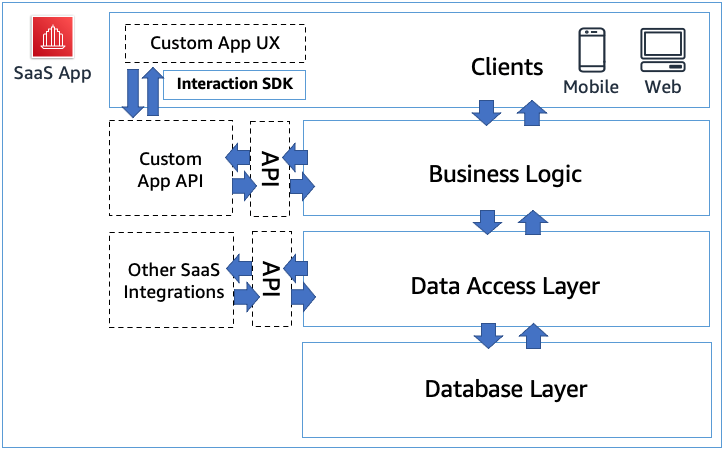
The following diagram shows an example of how a SaaS application works, including the data and logic layers, APIs, and client interfaces.
What are the benefits of SaaS integration?
SaaS integration connects third-party SaaS applications with your existing systems and other SaaS apps so that they can share data freely and automatically for business process automation. Here are some other specific benefits of using SaaS application integration.
Automated workflows
SaaS integration makes it easier to carry out workflows that involve multiple applications. An integration solution creates data pipelines between these systems, which reduces the amount of manual data entry you must perform to maintain performance and visibility.
Improved data quality
Integrating SaaS applications can help reduce data silos by connecting systems to a single source of truth (SSoT), which can enhance the accuracy, consistency, and reliability of your data. Improved data quality also supports better decision-making because you know you’re basing your decisions on accurate and up-to-date information.
Enhanced scalability
Using SaaS integrations allows you to respond rapidly to market or organizational shifts. For example, you can quickly add new SaaS applications to your suite of business tools or replace outdated ones without needing to overhaul how your technology or workforce operates.
Improved flexibility
SaaS integrations offer the flexibility to scale up or down according to changing business needs without significant up-front investment. You can add new functionalities or services as needed and easily integrate them with existing systems. The SaaS model also supports remote work environments and mobile access well, because cloud-based services are easily accessed from anywhere on any device.
Effective enterprise resource planning
SaaS integrations help connect your business applications to your enterprise resource planning (ERP) system and other cloud-based modules. You can create a unified system that manages all aspects of your business's operations, providing comprehensive visibility into business processes and performance. You can integrate SaaS solutions without the need for extensive technical development to improve resource management, financial planning, and customer service.
More effective decision-making
SaaS integration connects ERP systems, CRMs, production systems, and other on-premises and cloud-based applications. This unified environment makes it easier to see a complete view of business operations. You can more easily extract actionable insights from this complete dataset to support strategic planning and operational decision-making.
What are the approaches to SaaS integration?
There are several approaches to SaaS app integration. Each has different advantages and capabilities.
Custom integration
A custom SaaS integration is where you build a custom integration between your system and the SaaS application. Most of the time, this is a time-consuming and costly method of SaaS program integration. However, it offers greater flexibility and customization. If your business needs a specific function that commercial SaaS integrations don’t offer, a custom-built integration can be the best choice.
Integration platform as a service (iPaaS)
An integration platform as a service lets you create connections between SaaS platforms using prebuilt pathways. SaaS companies offer integration capabilities, giving you a no-code method of creating a reliable connection.
One of the leading benefits of iPaaS is that it saves time because you don’t have to build integrations from scratch. However, it abstracts away underlying data flows, which can hinder troubleshooting in some cases. You still need technical expertise to solve any potential issues with iPaaS integrations. One alternative is embedded iPaaS, in which SaaS providers integrate iPaaS capabilities into their products.
UI-based robotic process automation (RPA)
Robotic process automation (RPA) is a method of using bots to extract data and automate workflows from user interfaces (UIs). Instead of humans needing to collect data manually, these bots can collect and sync information between your SaaS applications and internal business systems. You can also use intelligent automation, or RPA powered by AI, to create software automation that excels at error handling, decision making, and other complex operations.
Although an automated strategy can save time, workflows will break if the UI of an application changes. This means that RPA requires hands-on maintenance and support. Other approaches are preferred for SaaS integrations where possible.
What are some SaaS integration use cases?
Many different business units find SaaS integrations valuable for improving their operations.
Human resources and accounting
HR teams often want to replace manual data entry with secure API integrations between Human Resource Management Systems (HRMS) software and payroll systems. Both HR and payroll teams benefit from having a reliable SSoT for workforce data. For example, when a new hire is added to the HR system, the integration automatically provisions their account in the payroll system and corporate identity management software.
Helpdesk and contact center
Support teams integrate helpdesk software with IT and project management tools to improve issue resolution. The system automatically creates a linked ticket containing all relevant case details.
Sales and marketing
These teams often want to integrate marketing automation platforms with CRM systems to monitor and manage customer lifecycles. For example, instead of scheduling manual exports between platforms, an integration triggers an event-driven data transfer as soon as a prospect engages with a campaign. The sales team receives the lead details in their CRM immediately, so they can respond faster and without having to worry about data entry errors on a new prospect.
Supply chain management
Connecting e-commerce storefronts with backend ERP systems enables the synchronization of business data. When a customer places an order, the integration pushes transaction details to the ERP for fulfillment. Simultaneously, the ERP can push real-time inventory levels and pricing updates back to the storefront, preventing stockouts and pricing discrepancies.
What are potential SaaS integration challenges?
The following are some common integration challenges.
Vendor interactions and limitations
SaaS vendors might have different levels of integration support, varying API capabilities, and limitations on data access or the number of API calls that you can make. Vendor lock-in is another concern. Businesses can become dependent on a particular vendor’s tools and services, making it difficult to switch to a different vendor in the future. Vendors might also have different release cycles and update schedules, which can affect the stability of integrated systems.
Development challenges
Developing different types of custom API integrations can be complicated and time-consuming. Custom API integration requires specialized knowledge of both the applications being integrated and the integration technology being used. You might have to go through several iterations of development and testing before data flows as required. You also might encounter software bugs that lead to manual workarounds, which minimize returns on investment. Low-code or no-code SaaS integration services can help alleviate the issues of custom integration development.
Performance issues
The speed and reliability of data transfers between the SaaS API and your system are crucial. Latency can affect user experience. Performance challenges arise when you’re trying to synchronize large datasets in real time or when there are network issues. Monitoring system health and resolving integration issues requires robust monitoring tools and processes.
Maintenance concerns
Over time, maintaining and updating custom integrations can lead to technical debt. As SaaS products evolve, you might need to change or rebuild existing integrations, which can be costly and time-consuming. APIs change, no-code solutions change, and data can change. It's a challenge to design integrations that are both scalable and flexible enough to accommodate future growth, including more features or users, without significant rework or investment.
Maintaining compliance
Data flows between systems can potentially create gaps in data governance. It is important to develop a SaaS integration strategy to maintain data security across your integrated systems and in transit.
How can AWS support your SaaS integration efforts?
Amazon AppFlow is a fully managed integration service that helps you securely transfer data between software as a service (SaaS) applications, such as Salesforce, SAP, Google Analytics, Facebook Ads, and ServiceNow, and AWS services such as Amazon Simple Storage Service (S3) and Amazon Redshift.
You can automate bidirectional data flows between SaaS applications and Amazon Web Services (AWS) services in just a few steps. Run the data flows at the frequency that you choose, whether on a schedule, in response to a business event, or on demand. Pay only for the events you process.
With Amazon AppFlow, you can:
- Simplify data preparation with transformations, partitioning, and aggregation
- Transfer data at scale without the need to provision system resources
- Automate cataloging your data to discover and share it across AWS analytics and ML services
Get started with SaaS integration on AWS by creating a free account today.
Next Steps on AWS
Browse all cloud computing concepts
Browse all cloud computing concepts content here:
Did you find what you were looking for today?
Let us know so we can improve the quality of the content on our pages